Webhook Notifications
In this Article:
In ECAL, you can register one or more webhooks to receive POST notifications whenever a User subscribes via your ECAL widget(s).
There are 2 reason you may consider using Webhooks.
- Receiving Subscriber data in real-time so you can update your CRM
- Receiving the Subscriber’s ecalId upon subscription. Allowing you to interact with that individual’s calendar via the ECAL API
If you are using Private Events in ECAL, you must setup a webhook to receive the Subscriber’s ecalId. For more information on Private Events, see our guide.
How it works
When a User successfully subscribes using your ECAL Widget, ECAL will send a POST notification to all of the callback URLs you have registered. At minimum this will contain the new Subscriber’s ecalId and email, as well as any addition registration information you have configured your widget to collect.
How to setup your webhook
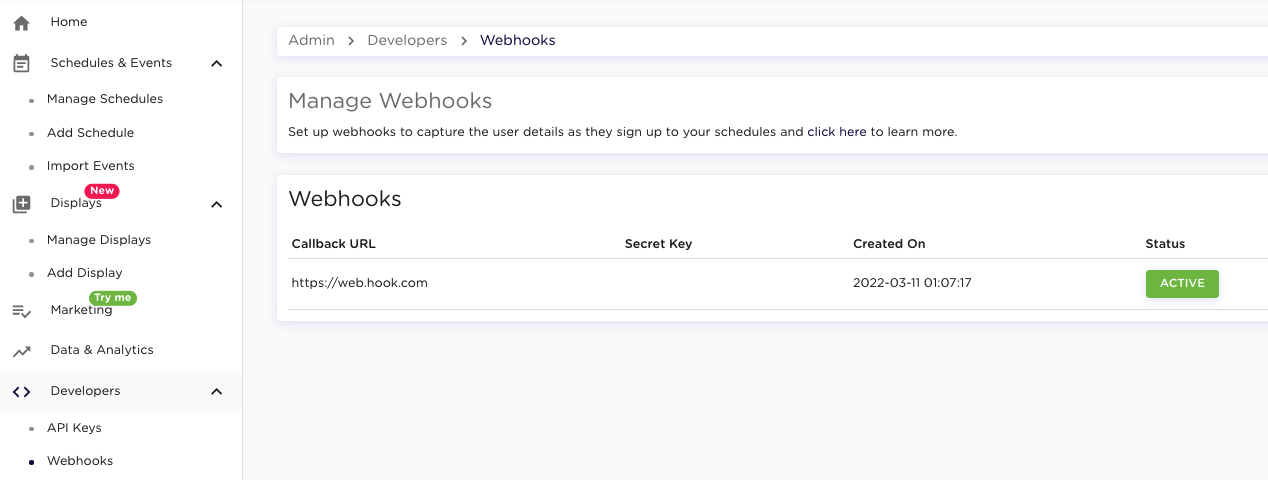
To setup a webhook, login to your ECAL Admin (https://app.ecal.com/login) and click Developers > Webhooks in the side menu. From here you can register a new callback URL as well as activate/deactivate and edit existing callbacks.
When registering a callback URL you have the option to specify an Encryption Secret Key. If provided, ECAL will encrypt all notifications sent to your callback URL using this value as the secret key. For more detail, refer to “Decrypting the payload” information of the “Processing notifications” section below.
Processing notifications
When a notification is received, it will contain at least 3 elements:
-
ecalId - The ID used to interact with the Subscriber’s ECAL calendar.
-
email - The email address the Subscriber used when subscribing to ECAL.
Note: If you pass through an email address of the user to the ECAL Display (e.g., via the embed code), and it differs from the email used to subscribe to ECAL, the email address originally passed to the ECAL Display will be recorded in thesecondary_emailfield. This allows you to easily associate the subscriber’s registered email in ECAL with the user’s registered email in your own platform. -
timestamp - A unix timestamp denoting the time the user subscribed.
In addition to the above basic elements, the payload may also contain location data and any data requested of the Subscriber during the subscription process such as what calendars they have chosen to subscribe to (if any).
It is recommended that upon receiving a notification, all information is stored against the User record within your own platform.
The Notification Payload
Example
The following is an example of a common payload fields you might receive upon a successful user registration, or re-subscription using the ECAL widget. In this case, the Publisher hasn’t asked for any additional user details via the ECAL widget, and as such, only a subset of the fields are delivered.
POST https://www.yourcallbackurl.com/
{
    "ecalId": "57e9547dd8178cf324f737c4",
    "email": "joe.user@gmail.com",
    "secondary_email": "secondary.joe.user@gmail.com",
    "timestamp": "1513568248",
    "calendarNames": [
        "AAdvantage Aviator",
        "Barclaycard Visa"
    ],
    "calendarIds": {
        "1": "57a22c28e0ee0825664e7774",
        "2": "59c51af05b5a42f21b8b4567"
    },
    "calendarReferences": [
        "AAdvantage-Aviator",
        "Barclaycard-Visa"
    ],
    "location": {
        "country_code" : "AU",
        "country_name" : "Australia",
        "state_code" : "VIC",
        "state_name" : "Victoria",
        "zip_code" : "3004",
        "city_name" : "Melbourne",
        "latitude" : -37.814,
        "longitude" : 144.9633
    },
    "custom_fields": [
      {
          "name" : "Favourite Team", "value" : "Manchester United"
      },
      {
          "name" : "Date of Birth",  "value" : "1979-08-12"
      },
      {
          "name" : "Over 13 yrs",  "value" : "Yes"
      }
    ],
    "reference": "ref-1233_$valid"
}
The Manage My ECAL portal also produces webhook notifications for certain actions that the user might perform. Such as:
- User adds schedule(s) to their subscription
POST https://www.yourcallbackurl.com/
{
    "ecalId": "57e9547dd8178cf324f737c4",
    "email": "joe.user@gmail.com",
    "timestamp": "1513568248",
    "calendarNames": [
        "AAdvantage Aviator",
        "Barclaycard Visa"
        "Citi Aadvantage" // the new schedule added to the subscription
    ],
    "calendarIds": {
        "1": "57a22c28e0ee0825664e7774",
        "2": "59c51af05b5a42f21b8b4567"
        "3": "6566bdc6ceca107e1ee1277c"
    },
    "calendarReferences": [
        "AAdvantage-Aviator",
        "Barclaycard-Visa",
        "Citi Aadvantage"
    ],
    "reference": "ref-1233_$valid"
}
- User removes schedule(s) from their subscription
POST https://www.yourcallbackurl.com/
{
    "ecalId": "57e9547dd8178cf324f737c4",
    "email": "joe.user@gmail.com",
    "timestamp": "1513568248",
    "calendarNames": [ // the new state of the subscription minus the removed schedule
        "AAdvantage Aviator",
        "Citi Aadvantage"
    ],
    "calendarIds": {
        "1": "57a22c28e0ee0825664e7774",
        "2": "6566bdc6ceca107e1ee1277c"
    },
    "calendarReferences": [
        "AAdvantage-Aviator",
        "Citi Aadvantage"
    ],
    "reference": "ref-1233_$valid"
}
- User unsubscribes
POST https://www.yourcallbackurl.com/
{
    "ecalId": "57e9547dd8178cf324f737c4",
    "email": "joe.user@gmail.com",
    "timestamp": "1513568248",
    "reference": "ref-1233_$valid",
    "action": "unsubscribe"
}
Parameters
| Field | Type | Required | Example |
|---|---|---|---|
| age_group | String | NO | 25-34 |
| calendarIds | Object | NO | { |
| calendarNames | Array [String] | NO | [ “AAdvantage-Aviator”,“Barclaycard-Visa” ] |
| calendarReferences | Array [String] | NO | [ “AA-Aviator-Ref”,“B-Visa-Ref” ] |
| country | String | NO | US |
| custom_fields | Array [Object] | NO | [ |
| ecalid | String | YES | 57e9547dd8178cf324f737c4 |
| String | YES | rfitz@gmail.com | |
| first_name | String | NO | Ryan |
| gender | String | NO | M |
| last_name | String | NO | Fitzgerald |
| location | Object | NO | { |
| mobile | String | NO | +61444444444 |
| timestamp | Integer | YES | 1513568248 |
| zip | String | NO | 06716 |
| reference | String | NO | ref-1233_$valid |
| state | Object | NO | |
| action | String | YES | Only unsubscribe for unsubscriptions using the Manage My ECAL Portal |
| secondary_email | String | NO | secondary_user@email.com |
Decrypting the Payload
If you have specified a Secret key when registering your Callback URL, all POST made to your url will be encrypted.
Example
POST https://www.yourcallbackurl.com/
{
    "payload": "6AXjTO\/pq\/PQ8rEiDI..."
}
To decrypt the payload, follow these steps.
- base64 decode the string contained in the payload value.
- create a Block with your 32 byte secret key (if not 32 bytes, you need to repeat your secret key up to 32 bytes)
- Using that block, get a GCM.
- Using that GCM, Open your decoded payload
If you require any additional information, please contact support@ecal.com or live chat with us on ecal.com.
Managing failed notifications
It is possible, for a variety of reason, that some notifications might fail to deliver to your callback. In this situation, ECAL will attempt to resend the notification 3 more times over the course of 1 hour. After all retry attempts have been made, ECAL will stop attempting delivery of the failed notification.
Subscriptions will also be delivered to you via our Data Delivery Service. You can use it to ensure that no Subscriptions are missed in the event of a failed delivery.